
Print Salesforce mailing labels without the CSV.
Tick Contacts, Leads or Accounts on a list view, pick an Avery template, and get a PDF laid out to that sheet.
Not on AppExchange yet. The waitlist is open.

ExampleAvery 5160 drawn to scale, top two rows. Six labels shown.Avery 5160 drawn to scale, first row. Two of its three labels shown. The names and addresses are made up.Photo: National Photo Company, mail sorting room, U.S. Post Office, Washington, about 1920. Public domain, Library of Congress.
One sheet, 30 positions. Each filled cell is one selected record, drawn at true proportions.
Contacts ticked on a list view fill the first 10 of the sheet's 30 positions, 3 across and 10 down, as Avery cuts it.
10 of 30 positions used. The other 20 stay blank for the next run.
Pick a template and the fields
The screen from the developer org. The picker only lists fields the signed-in user can already see.
Click to enlarge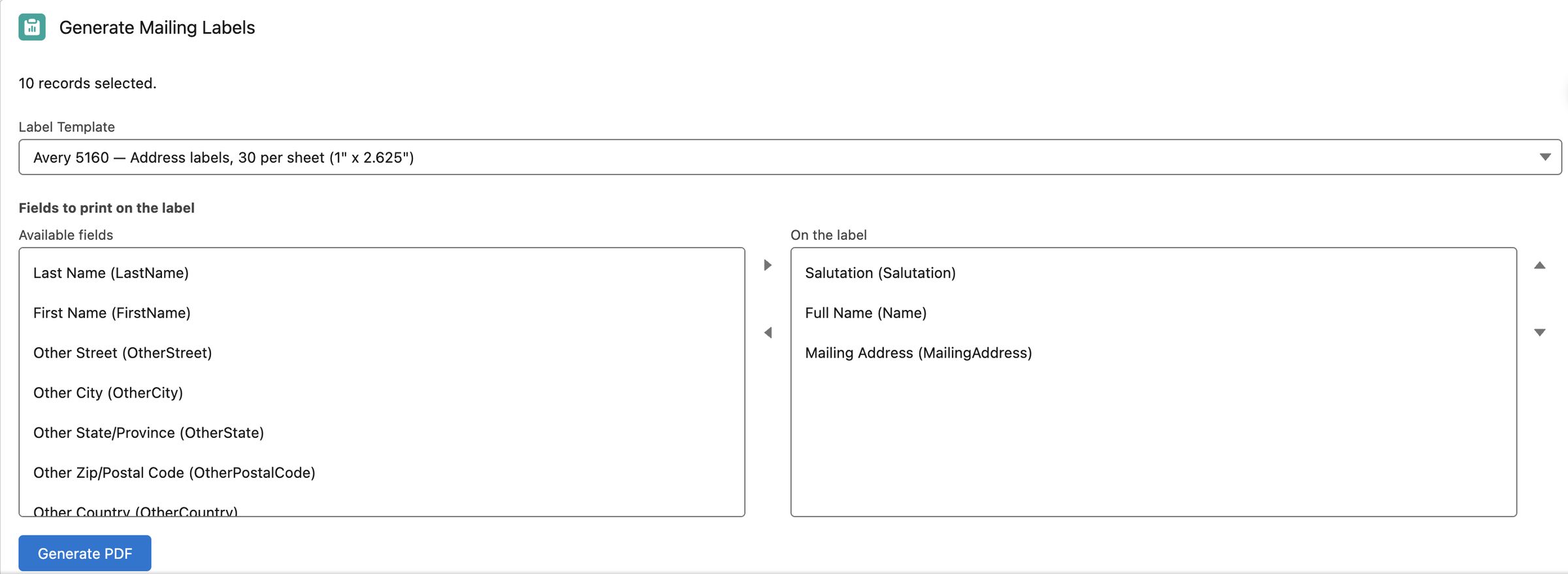 Tap to enlargeSource: screenshot from the developer org (sample data), cropped. Opens the full screen. On a phone the parts shown are at actual size.
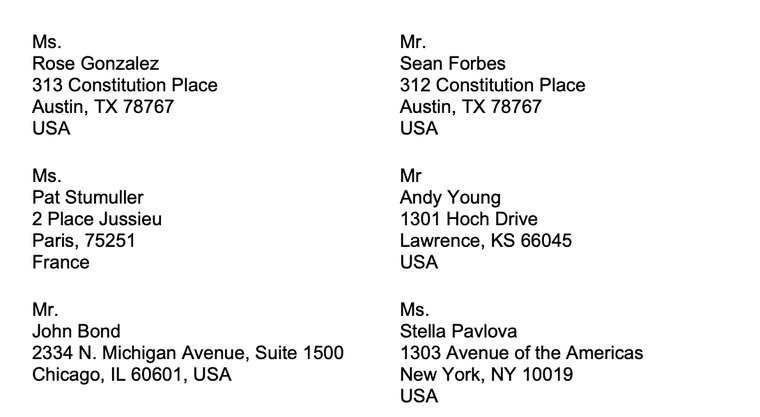
The PDF
Real output from the developer org, cropped to the top left of the page. The file's own text has no borders. Names are Salesforce sample data.
Select, pick, print.
Select
Tick the Contacts, Leads or Accounts you want on any list view.
Replaces the CSV export
Pick
Choose an Avery template and the fields to print, or reuse a saved preset.
Replaces the Word mail merge
A PDF laid out to that sheet's exact columns, rows and margins.
Replaces the alignment fixes
12 Avery sheets, each to scale.
Labels, name badges, postcards, cards and tent cards. Each layout carries its own columns, rows, margins and gaps.
- 5160Address labels2.625 x 1 in
- 5163Shipping labels4 x 2 in
- 5164Shipping labels4 x 3.333 in
- 5167Return-address labels1.75 x 0.5 in
- 5366File-folder labels3-7/16 x 2/3 in
- 5371Business cards3.5 x 2 in
- 5392Name badges4 x 3 in
- 8387Postcards4.25 x 5.5 in
- 5389Postcards, landscape6 x 4 in
- 3265Half-fold greeting cards8.5 x 5.5 in per panel
- 5305Medium tent cards8.5 x 2.5 in per panel
- 5302Small tent cards3.5 x 2 in per panel
Outlines share one scale. Layouts were checked against Avery's own template PDFs, except the small tent card (5302), which uses a simplified fold-pair layout. Greeting cards and tent cards print flat and you fold them by hand. Custom label sizes are not in the first release.
No server of ours.
PrintCrate makes the label sheet inside your own Salesforce org. We run no server in the path, so your record data is never sent to us.
It sees what the user sees
The picker lists only fields the signed-in user can already read.
It changes nothing
Read-only on Contact, Lead and Account. In normal use it writes only its own usage and plan records and saved presets.
It keeps no copy
The PDF goes to your browser. PrintCrate does not store it.
Planned: when paid upgrades open, they will go through Stripe checkout, which will carry no record data. Not live yet. Read the security page
Built for teams that still send real mail.
Nonprofit and NPSP admins
Donor appeals and thank-you letters, straight from a list view instead of an export that goes stale.
Nonprofit mailingsSmall business Salesforce users
Customer mailings and renewal notices without a marketing platform you do not need.
Small business and membershipMembership and event admins
Member packets and event name badges from the same Contact records.
Name badges from Salesforce
Planned pricing: free, then flat.
- $0
Free at launch
25 labels a month, all 12 templates, saved presets, email support. No card.
Standard
Unlimited labels, all 12 templates, saved presets, email support.
$24/moPlanned price
Flat price, not per user. The free count resets each calendar month. Nothing can be bought yet: PrintCrate is not on AppExchange. Pricing details
Which objects does it work with?
Contact, Lead and Account each get a one-click list-view button. Other objects, standard or custom, go through a standalone Label Generator page. That page is built but still waiting for a hands-on test.
Is PrintCrate on AppExchange yet?
Not yet. It is built and tested in a Salesforce developer org, but the listing is not complete. Join the waitlist and we will reach out directly once you can install it.
Is my record data sent to you?
No. The PDF is made and downloaded inside your own org session, with no server of ours in the path.
Can I use a custom label size?
Not in the first release. The library covers 12 common Avery sheets. Custom sizes are a possible later addition.
Is PrintCrate affiliated with Avery?
No. It reads Avery's published sheet dimensions and is not affiliated with or endorsed by Avery Products Corporation.
Get an email when PrintCrate is ready.
Not on AppExchange yet. A free tier of 25 labels a month is planned for launch. We will email you once, when you can install it.
